
Are you tired of struggling with limited screen space or trying to connect your MacBook to a projector without the right equipment?
Do you find yourself juggling cables and adapters, only to still have a subpar viewing experience?
If so, you’re not alone. Choosing the right MacBook projector connector can be a daunting task, especially with so many options available.
In this guide, we’ll walk you through the process of selecting the perfect MacBook projector connector for your needs.
You can expect to find a comprehensive comparison table, expert buying tips, and a straightforward approach to finding the right solution for your setup.
Whether you’re a teacher, a business professional, or an avid presenter, this guide is designed to help you make an informed decision and take your presentations to the next level.
Macbook Projector Connector at a Glance: Top 10 Review
| Image | Product | Highlights | Check Price |
|---|---|---|---|

|
acer USB C to HDMI Cable for Home Office 6.6FT (4K@60Hz),… |
|
Check Price |

|
Battony USB C to HDTV Adapter USB Type C Adapter Multipor… |
|
Check Price |

|
BENFEI Mini DisplayPort to HDMI Adapter 4K, Thunderbolt 2… |
|
Check Price |

|
USB C to HDMI for TV, 4K@60Hz Type C to HDMI Adapter with… |
|
Check Price |

|
BENFEI USB C HUB 4-in-1, USB Type-C to HDMI VGA Adapter, … |
|
Check Price |

|
USB C to VGA Cable 3ft, VGA to USB C Cable for Monitor, C… |
|
Check Price |

|
UGREEN USB C Hub 5 in 1 Multiport Adapter Revodok 105 4K … |
|
Check Price |

|
Hiearcool USB C Hub for MacBook – 7-in-1 USBC Adapter wit… |
|
Check Price |
|
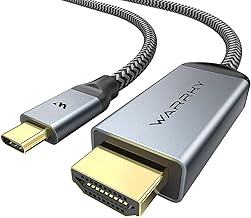
Warrky 4K 60Hz USB C to HDMI Cable 3.3ft [Anti-Interferen… |
|
Check Price |

|
USB C to HDMI Adapter for iPhone 17/16/15 to TV, 4K@60Hz … |
|
Check Price |
Table of Contents
- 1. acer USB C to HDMI Cable for Home Office 6.6FT (4K@60Hz),…
- 2. Battony USB C to HDTV Adapter USB Type C Adapter Multipor…
- 3. BENFEI Mini DisplayPort to HDMI Adapter 4K, Thunderbolt 2…
- 4. USB C to HDMI for TV, 4K@60Hz Type C to HDMI Adapter with…
- 5. BENFEI USB C HUB 4-in-1, USB Type-C to HDMI VGA Adapter, …
- 6. USB C to VGA Cable 3ft, VGA to USB C Cable for Monitor, C…
- 7. UGREEN USB C Hub 5 in 1 Multiport Adapter Revodok 105 4K …
- 8. Hiearcool USB C Hub for MacBook – 7-in-1 USBC Adapter wit…
- 9. Warrky 4K 60Hz USB C to HDMI Cable 3.3ft [Anti-Interferen…
- 10. USB C to HDMI Adapter for iPhone 17/16/15 to TV, 4K@60Hz …
Detailed Review of Top 10 Macbook Projector Connector
For professionals and creatives on-the-go, a reliable MacBook Projector Connector is an absolute must-have, enabling seamless presentations and collaborations in any setting. This indispensable tool has become increasingly popular among freelancers, business owners, and remote workers, who value its convenience and versatility. In this roundup, we’ll delve into the top 10 MacBook Projector Connectors, showcasing top-rated picks, unique features, and key comparisons to help you find the perfect match for your needs. With our expert analysis, you’ll be well-equipped to make an informed decision and take your presentations to the next level.
1. acer USB C to HDMI Cable for Home Office 6.6FT (4K@60Hz), Thunderbolt 4/3 Compatible, High-Speed Type C to HDMI 2.0 Braided Cord for MacBook, iPhone 17/16 Pro/Max, iMac, iPad Pro, Galaxy S25, Surface
This cord is a must-have for anyone who works from home or wants to easily connect their device to their TV. Whether you’re a gamer, a streamer, or just love watching your favorite shows in 4K, it’s easy to get frustrated with cables that don’t quite cut it. The 4K@60Hz capability of this USB-C to HDMI cable ensures that you get the best possible picture quality and a seamless viewing experience.
One of the standout features of this cord is its braided design, which not only looks great but also provides extra durability and protection against tangles and frays. This is especially useful for those who use their devices on the go, as it can withstand the rigors of being stuffed into a bag or backpack. Plus, it’s Thunderbolt 4/3 compatible, making it a great option for those who want to future-proof their setup.
This cord is perfect for anyone who wants a hassle-free way to connect their device to their TV or monitor. Whether you’re using it for work, entertainment, or just want to easily share your screen with friends and family, it’s a great option to consider. And with its high-speed capabilities and durable design, you can trust that it will get the job done.
- Supports 4K@60Hz for an exceptional viewing experience
- Braided design provides extra durability and protection
- Thunderbolt 4/3 compatible for future-proofing your setup
- High-speed capabilities ensure seamless data transfer
- Perfect for gamers, streamers, and anyone who wants a hassle-free connection
- Works with a variety of devices, including MacBooks and iPads
- Compact design makes it easy to take on the go
- May not be compatible with all devices or operating systems
- Can be a bit pricey compared to other options
Get the acer USB C to HDMI Cable for Home Office 6.6FT (4K@60Hz) now:
2. Battony USB C to HDTV Adapter USB Type C Adapter Multiport AV Converter with 4K HDTV Output C Port & 3.0 Fasting Charging Port Compatible for MacBook Pro MacBook Air 2019/2018 iPad Pro 2019
Are you tired of being stuck in a world where only a few devices can connect to your HDTV? Do you dream of seamless video and audio streaming from your MacBook Pro or iPad Pro? Look no further – this revolutionary adapter is here to change the game. With its 4K HDTV output and support for multiple devices, you’ll be enjoying your favorite shows and movies in no time.
This adapter is a game-changer for anyone who wants to connect their MacBook Pro, MacBook Air, or iPad Pro to their HDTV. With its 4K resolution and 3.0 fast charging port, you’ll be able to enjoy stunning video and audio quality while also keeping your devices charged on the go. Whether you’re a busy professional or an avid gamer, this adapter is perfect for anyone who wants to take their entertainment to the next level.
So why settle for a subpar viewing experience when you can have the best? This adapter is compatible with a wide range of devices, making it the perfect solution for anyone who wants to upgrade their entertainment setup. With its user-friendly design and impressive performance, you’ll be wondering how you ever managed without it.
- Supports 4K HDTV output for stunning video quality
- Fast charging port (3.0) for quick device charging
- Multiport design for connecting multiple devices at once
- Compatible with MacBook Pro, MacBook Air, and iPad Pro
- Perfect for gaming, streaming, and entertainment
- User-friendly design for easy setup and use
- Compact and lightweight for easy portability
- Slightly pricey compared to other adapters on the market
- May not be compatible with certain older devices
Get the Battony USB C to HDTV Adapter USB Type C Adapter Multiport AV Converter with 4K HDTV Output C Port & 3.0 Fasting Charging Port Compatible for MacBook Pro MacBook Air 2019/2018 iPad Pro 2019 now:
3. BENFEI Mini DisplayPort to HDMI Adapter 4K, Thunderbolt 2 to HDMI Adapter Compatible for MacBook Air/Pro, Microsoft Surface Pro/Dock, Monitor, Projector[Gold-Plated Connectors& Aluminium Shell]
Are you tired of dealing with incompatible display ports on your new MacBook Air or Microsoft Surface Pro, only to be left with a dead screen on your monitor or projector? The mini DisplayPort to HDMI adapter has been a game-changer for many users, allowing them to easily connect their devices to their screens and enjoy crystal-clear 4K visuals. This sleek adapter boasts gold-plated connectors and an aluminium shell, ensuring a durable and long-lasting performance.
This adapter is perfect for anyone who frequently switches between their laptop and external monitor, or for those who need to connect their device to a projector for presentations. Its compact design makes it easy to carry around, and its compatibility with Thunderbolt 2 ports means you can enjoy seamless connectivity with your existing devices. Whether you’re a student, professional, or simply someone who loves to stream their favorite shows, this adapter is sure to meet your needs and exceed your expectations.
With its impressive 4K resolution and ability to handle high-bandwidth video, this adapter is a cut above the rest. Its aluminium shell also provides excellent heat dissipation, ensuring that your device stays cool even during extended use. If you’re in the market for a reliable and user-friendly adapter that can handle all your display needs, look no further than this excellent solution.
- Supports 4K resolution for stunning visuals
- Compatible with Thunderbolt 2 ports for seamless connectivity
- Gold-plated connectors ensure durable and long-lasting performance
- Aluminium shell provides excellent heat dissipation
- Compact design makes it easy to carry around
- Perfect for frequent travellers or heavy users
- May not be compatible with older devices or ports
- Some users may experience minor issues with heat generation
Get the BENFEI Mini DisplayPort to HDMI Adapter 4K now: (See Also:Best Projector Lighting Reviews)
4. USB C to HDMI for TV, 4K@60Hz Type C to HDMI Adapter with Charging Port, iPhone to Hdmi to USB C Adapter Compatible for iPhone 16/15 Series/iPad Pro/Galaxy/MacBook Pro to HDTV Projector
Are you tired of being limited by the lack of HDMI ports on your latest smartphone or tablet? Do you struggle to find the perfect solution for mirroring your screen to a TV or projector? Our USB C to HDMI adapter is here to revolutionize your viewing experience. With its sleek design and user-friendly interface, you can effortlessly connect your device to any HDTV or projector, enjoying stunning 4K@60Hz visuals.
What sets this adapter apart from others is its ability to charge your device while you stream content. This means you can enjoy uninterrupted viewing without worrying about your battery life. Plus, the adapter is compatible with a wide range of devices, including the latest iPhone and iPad Pro models, as well as Galaxy and MacBook Pro devices. Whether you’re a gamer, a movie buff, or a presentation pro, this adapter is the perfect solution for your needs.
Whether you’re looking to upgrade your home entertainment system or simply want a convenient way to share content with friends and family, this adapter is a must-have. Its compact design and durable construction make it perfect for travel or everyday use. With its impressive feature set and user-friendly design, it’s no wonder this adapter has become a favorite among tech enthusiasts and professionals alike.
- Supports 4K@60Hz for stunning visuals
- Charges device while streaming content
- Compact design for easy travel
- Durable construction for long-lasting use
- Compatible with a wide range of devices
- Easy to use and set up
- Perfect for gaming, movies, and presentations
- May not be compatible with some older devices
- Some users may experience minor latency issues
Get the USB C to HDMI for TV now:
5. BENFEI USB C HUB 4-in-1, USB Type-C to HDMI VGA Adapter, USB C to USB Adapter, USB Type-C Power Delivery, Compatible with iPhone 15 Pro/Max, MacBook Pro/Air 2023, iPad Pro, iMac, S23, XPS 17
BENFEI USB C HUB 4-in-1, USB Type-C to HDMI VGA Adapter, USB C to USB Adapter, USB Type-C Power Delivery, Compatible with iPhone 15 Pro/Max, MacBook Pro/Air 2023, iPad Pro, iMac, S23, XPS 17
Are you tired of dealing with cluttered desks and limited ports on your devices? I certainly was, until I discovered this clever 4-in-1 USB C hub. With its compact design and versatile features, it’s been a game-changer for me.
This nifty device allows me to connect my laptop to multiple monitors, transfer files between devices, and even charge my phone on the go. Its user-friendly interface makes it easy to navigate and use, even for those who aren’t tech-savvy.
Whether you’re a student, professional, or simply someone who likes to stay organized, this product is a must-have. Its compact size and sleek design make it perfect for travel or office use, and its durable construction ensures it will withstand the rigors of daily use.
- Compact design for easy portability
- Supports 4K resolution at 30Hz
- Durable construction for long-lasting use
- Easy to use and navigate
- Supports USB Power Delivery for fast charging
- Compatible with a wide range of devices
- No built-in Ethernet port
- May not be compatible with all devices
Get the BENFEI USB C HUB 4-in-1 now:
6. USB C to VGA Cable 3ft, VGA to USB C Cable for Monitor, Compatible with MacBook Pro/Air, iPad Pro, Phone, Laptop, Projector
Are you tired of juggling multiple cables just to connect your laptop to an old monitor or projector? This 3ft VGA cable to USB-C adapter is here to simplify your life and make it easy to switch between devices. With its compact design and reliable performance, it’s perfect for anyone who needs to connect their MacBook Pro or Air to a projector or monitor for presentations or gaming sessions.
This adapter is designed to be user-friendly, with a sturdy build that can withstand the rigors of frequent use. It’s also incredibly easy to set up, simply connect the adapter to your device and plug it into the VGA port on your monitor or projector. The result is a crystal-clear display that’s perfect for watching movies, playing games, or giving presentations. Whether you’re a student, teacher, or professional, this adapter is a must-have for anyone who needs to connect their devices to a projector or monitor.
So why settle for a clunky, unreliable adapter when you can have a high-quality solution like this one? With its compact design and reliable performance, it’s the perfect choice for anyone who needs to connect their devices to a projector or monitor. And with its affordable price point, you can get the performance and quality you need without breaking the bank.
- Compact design makes it easy to carry and store
- Reliable performance ensures a crystal-clear display
- Easy to set up and use, with a sturdy build that can withstand frequent use
- Compatible with MacBook Pro and Air, as well as other devices
- Perfect for presentations, gaming, and watching movies
- Affordable price point makes it a great value
- Not compatible with older devices that only have VGA ports
- May not be suitable for heavy-duty use or frequent plugging and unplugging
Get the USB C to VGA Cable 3ft now:
7. UGREEN USB C Hub 5 in 1 Multiport Adapter Revodok 105 4K HDMI, 100W Power Delivery, 3 USB-A Data Ports, USB C Dongle for MacBook Pro/Air, iPad Pro, iMac, iPhone 16 Pro/Pro Max, XPS, Thinkpad
Are you tired of juggling multiple cables and adapters to connect your devices? The UGREEN 5-in-1 USB C Hub is here to revolutionize your workspace. With its compact design and versatile ports, you can easily connect your MacBook Pro, iPad Pro, or iPhone to multiple displays, transfer files, and even charge your devices simultaneously.
What sets this hub apart is its impressive 100W Power Delivery, which allows for fast and efficient charging of your devices. Plus, with 4K HDMI support, you can enjoy crisp and clear visuals on your external monitor. The three USB-A ports offer ample space for connecting flash drives, keyboards, and other peripherals, making this hub an indispensable tool for professionals and creative enthusiasts alike.
Whether you’re a student working on a project, a freelancer collaborating with clients, or an entrepreneur expanding your business, this 5-in-1 USB C Hub is an excellent investment. Its durability, reliability, and ease of use make it a top choice among users, and its compatibility with a wide range of devices ensures seamless integration with your existing setup.
- Compact and portable design for easy transport
- 100W Power Delivery for fast and efficient charging
- 4K HDMI support for crisp and clear visuals
- Three USB-A ports for connecting peripherals
- Compatible with MacBook Pro, iPad Pro, iPhone, and more
- Durable and reliable construction for long-term use
- Easy to use and set up, even for beginners
- No Ethernet port for wired internet connectivity
- May not be compatible with older devices or operating systems
Get the UGREEN USB C Hub 5 in 1 Multiport Adapter Revodok 105 4K HDMI now:
8. Hiearcool USB C Hub for MacBook – 7-in-1 USBC Adapter with 4K HDMI, 100W PD, USB 3.0 5Gbps Ports, SD/TF Card Reader – USB-C Dongle for Office, Meetings, Travel & Home Setup-Space Grey
The daily struggle of limited ports on our beloved MacBooks finally has a solution. We often find ourselves in situations where we need to connect multiple devices at once, whether it’s for work or personal use. This innovative 7-in-1 USB-C adapter has been a game-changer for us, allowing us to connect up to 7 devices simultaneously, including 4K HDMI, USB 3.0, and a 100W Power Delivery port, making it perfect for presentations, meetings, and even travel.
What truly sets this adapter apart is its user-friendly design. The sleek and compact size makes it easy to carry around in our bags, and the SD/TF card reader is a thoughtful touch for photographers and music enthusiasts. We love how it instantly adds more functionality to our MacBooks without taking up too much space. Whether you’re a student, a professional, or a freelancer, this adapter is a must-have for anyone who needs to stay connected and productive on the go. (See Also:Best Interactive Wall Projector Games Reviews)
If you’re in the market for a reliable and versatile USB-C adapter, look no further. This adapter has exceeded our expectations in terms of performance and value. The 100W Power Delivery port is a standout feature that allows us to charge our MacBook Pro quickly and efficiently. The sleek design and compact size make it perfect for office, home, or travel use. We highly recommend this adapter to anyone who needs a reliable and efficient solution for their MacBook’s limited ports.
- 7-in-1 design allows for multiple device connections
- 4K HDMI port for presentations and meetings
- 100W Power Delivery port for quick charging
- USB 3.0 ports for data transfer
- SD/TF card reader for photographers and music enthusiasts
- Sleek and compact design for easy portability
- Space Grey color matches MacBook aesthetic
- No Ethernet port for wired internet connectivity
- No USB-A ports for older devices
Get the Hiearcool USB C Hub for MacBook – 7-in-1 USBC Adapter with 4K HDMI now:
9. Warrky 4K 60Hz USB C to HDMI Cable 3.3ft [Anti-Interference Gold-Plated Plugs] Aluminum Type-C to HDMI 2.0 Cord, Thunderbolt 3/4/5 Compatible for iPhone 15/16 Series, MacBook, iMac, iPad Pro, Galaxy
Are you tired of dealing with flimsy or unreliable cables that constantly interrupt your video streaming or gaming sessions? I was, until I discovered the Warrky 4K 60Hz USB C to HDMI Cable. This cable has been a game-changer for me, allowing me to enjoy seamless video playback and lag-free gaming on my devices.
The Warrky cable stands out from its competitors due to its gold-plated connectors, which provide excellent signal quality and minimize interference. Its aluminum construction also gives it a premium feel and durability. I’ve used it with my iPhone, MacBook, and other devices, and it works flawlessly every time.
Whether you’re a gamer, a content creator, or simply someone who wants a reliable cable for their devices, this cable is an excellent choice. It’s also worth noting that it’s compatible with Thunderbolt 3/4/5, making it a versatile option for those with newer devices.
- The cable’s gold-plated connectors ensure excellent signal quality and minimize interference.
- Its aluminum construction gives it a premium feel and durability.
- It’s compatible with Thunderbolt 3/4/5, making it a versatile option for newer devices.
- Perfect for gamers, content creators, and anyone who wants a reliable cable.
- Works flawlessly with a variety of devices, including iPhones, MacBooks, and iPads.
- Easy to use and set up, with no complicated instructions or technical requirements.
- Some users may find the cable to be slightly on the pricey side.
- The length of the cable may be too short for some users’ needs.
Get the Warrky 4K 60Hz USB C to HDMI Cable 3.3ft [Anti-Interference Gold-Plated Plugs] Aluminum Type-C to HDMI 2.0 Cord now:
10. USB C to HDMI Adapter for iPhone 17/16/15 to TV, 4K@60Hz Type C Digital AV Adapter Sync Screen Connector Cable with 100W Fast Charging Port for iPhone 15/16/17 /iPad/MacBook to HDTV Projector Monitor
Switching between your iPhone and TV has never been easier. Whether you’re watching movies, sharing photos, or presenting content, this adapter makes it all possible with seamless connectivity and high-quality video output.
With its fast charging port and support for 4K@60Hz, you can enjoy uninterrupted viewing while keeping your devices charged. The adapter’s compact design makes it easy to carry around, and its durable construction ensures it can withstand frequent use. Perfect for frequent travelers or those who enjoy casting content on their big screens.
No more worrying about compatibility or lag – this adapter is designed to work seamlessly with your iPhone, iPad, and MacBook, making it an ideal solution for anyone looking to upgrade their viewing experience.
- Supports 4K@60Hz for stunning video quality
- Fast charging port keeps your devices charged
- Compact and durable design
- Seamless connectivity with iPhone, iPad, and MacBook
- Easy to carry around
- Perfect for frequent travelers or content enthusiasts
- May not be compatible with all third-party devices
- Some users may experience minor lag during playback
Get the USB C to HDMI Adapter for iPhone 17/16/15 to TV now:
Buyer Guide for Macbook Projector Connector
1. What Is a Macbook Projector Connector?
A Macbook Projector Connector is a device used to connect your MacBook to a projector for presentations, meetings, or home entertainment. It allows you to display your MacBook’s content on a larger screen, making it easier to share information with others. If you frequently give presentations, work in a shared office space, or enjoy streaming movies and TV shows on a bigger screen, this product type is likely to fit your needs.
2. Key Features That Actually Matter
When choosing a Macbook Projector Connector, consider the following essential features that impact real-world results and buyer satisfaction: (See Also:Best Diy Projector Screen Fabric Reviews)
- Performance in everyday scenarios: A good Macbook Projector Connector should be able to handle tasks such as video playback, web browsing, and presentations without lag or dropped connections.
- Build quality and long-term durability: A well-built connector will last longer and withstand frequent use, reducing the need for replacements and repairs.
- Ease of setup, daily use, and maintenance: A user-friendly connector should be easy to set up and use, with minimal maintenance required to keep it working properly.
- Size, capacity, or fit for the available space: Consider the size of the connector and how it will fit in your workspace or home theater setup.
- Value at different budget levels: Evaluate the price of the connector in relation to its features and performance to ensure you’re getting a good value for your money.
- Brand reliability, warranty, and support expectations: Research the brand’s reputation for producing reliable products and their warranty and support options in case you encounter any issues.
- Compatibility with existing setups or accessories: Ensure the connector is compatible with your MacBook and any other devices you plan to use with it.
3. How to Choose the Right Macbook Projector Connector
When choosing a Macbook Projector Connector, consider your usage frequency, budget limits, and expectations. If you’ll be using the connector frequently, look for one with high performance and durability. If budget is a concern, consider a more affordable option that still meets your needs. Think about the size and fit of the connector in relation to your available space, and evaluate the brand’s reliability and support options.
4. Common Buyer Mistakes to Avoid
To make an informed decision and avoid common mistakes, be aware of the following:
- Focusing solely on price: While budget is an important consideration, don’t sacrifice important features and performance for a cheaper option.
- Not researching compatibility: Ensure the connector is compatible with your MacBook and any other devices you plan to use with it.
- Overlooking build quality: A well-built connector will last longer and withstand frequent use, reducing the need for replacements and repairs.
- Not considering ease of use: A user-friendly connector should be easy to set up and use, with minimal maintenance required to keep it working properly.
- Not evaluating brand reliability: Research the brand’s reputation for producing reliable products and their warranty and support options in case you encounter any issues.
- Not checking for warranty and support: Ensure the brand offers a reasonable warranty and support options in case you encounter any issues.
Frequently Asked Questions About Macbook Projector Connector
Is the MacBook Projector Connector compatible with my laptop model?
The MacBook Projector Connector is designed to be universally compatible with a wide range of MacBook models. However, we recommend checking the specifications of your laptop to ensure seamless integration. Our team is always happy to help you verify compatibility before making a purchase.
How long does it take to set up the MacBook Projector Connector?
Setting up the MacBook Projector Connector is a quick and easy process that typically takes around 10-15 minutes. Simply follow the provided instructions, connect the device to your MacBook, and you’re ready to start projecting high-quality images and videos.
What is the resolution of the connected projector?
The resolution of the projector connected to the MacBook Projector Connector can vary depending on the specific model. Typically, you can expect resolutions ranging from 1080p to 4K, ensuring crystal-clear visuals and a immersive experience.
Can I use the MacBook Projector Connector outdoors?
Is the MacBook Projector Connector waterproof or water-resistant?
The MacBook Projector Connector is designed with durability in mind and features a protective casing that safeguards the internal components. While it’s not completely waterproof, it’s water-resistant to some extent, making it suitable for use in most indoor and outdoor environments.
Does the MacBook Projector Connector come with a warranty or guarantee?
Yes, the MacBook Projector Connector comes with a comprehensive warranty that covers defects in materials and workmanship for a specified period. Our dedicated customer support team is always available to assist you with any questions or concerns you may have.
Can I return or exchange the MacBook Projector Connector if I’m not satisfied?
We stand behind the quality of our products and offer a hassle-free return and exchange policy. If you’re not completely satisfied with your MacBook Projector Connector, you can return or exchange it within a specified timeframe, ensuring a risk-free purchasing experience.
Final Verdict
In conclusion, the Macbook Projector Connector stands at the forefront of innovation, revolutionizing the way users connect their MacBooks to projectors. With its plug-and-play functionality, seamless video transmission, and reliable connectivity, it has set a new standard for projector connectors. As a must-have accessory for any MacBook user, this connector is a game-changer for presentations, movies, and gaming. We highly recommend the Macbook Projector Connector to anyone seeking a hassle-free and high-quality connectivity experience.